We use a Saitek Pro Flight X-56 RHINO Joystick. This joystick is great for an advanced Blue ROV Heavy.

We use a Saitek Pro Flight X-56 RHINO Joystick. This joystick is great for an advanced Blue ROV Heavy.
Hi Etienne
I bought the same configuration, like you suggested. Joystick from aliexpress an the board from LeoBodnar.
How’d you wire the joysticks? The joystick has 3 connections each (X/Y). Have you connected x and Y in the board ? What about the connectors “RX” and “RY” ?
Can you give me a hint so I can connect my joysticks correctly? Thanks a lot !
best regards
Thomas
I found the problem, the motor controller has a problem, the joystick is no problem.
sounds very interesting, now do you use only the joystick or also the other controler for up / down.
AND is it more or less plug and play with usb connectors ? or is this going to ask for advance knowledge ?
thanks
Hi All,
I am new to the Blue ROV2 but have recently purchased one. I am looking at moving away from the console controller and more towards a commercial ROV control system. I have looked at options and would like to know if anyone has used the farming sim joysticks or controllers? I have added links below.
The first is a very similar joystick to a commercial ROV and the second seems to have a useful rocker switch and button configuration. Depth and camera tilt could be programmed on the 2 orange rockers.
Hi @Geoff87 -
We’ve heard good things about this controller lately - would it meet your needs?
Hi Tony,
Thanks for your response. It looks like a fantastic controller but currently out of budget. I hope to be able to purchase one in the future.
Hi @Geoff87 -
Would you mind sharing your budget for a solution like this? #MarketResearch!
Hi Tony,
It is really hard to say but to give you an idea a complete basic Steamdeck is $550 which can be used as a controller and screen, as well as, being a pretty powerful piece of technology.
I know there is a small market for ROV controllers but as they are very similar to a gaming controller and the core parts are not very expensive I would say no more than $300.
Hey all!
Here’s our launch of our Waterproof ROV Handcontroller with the latest info! In summary it is a waterproof rugged substitute for the Xbox and Logitech Controllers. I has a bunch of extra knobs and encoders that could be pre-defined to match the front panel’s functions! This Handcontroller is ideal for BlueRobotics powered ROV’s!
cockpit-std-profile-joystick-ROV functions mapping-13.9.25.json (8.7 KB)
Hi all,
I have managed to configure my Thrustmaster Farmstick on the Linux Cockpit platform. I have it running on my Steamdeck and with the help of a bluetooth keyboard got it running. Originally I tried on my Mac but struggled to get it setup.
My Steamdeck will be the base station for the ROV and connected to the joystick and larger screen when completing some tasks. The great thing about this setup is its versitility.
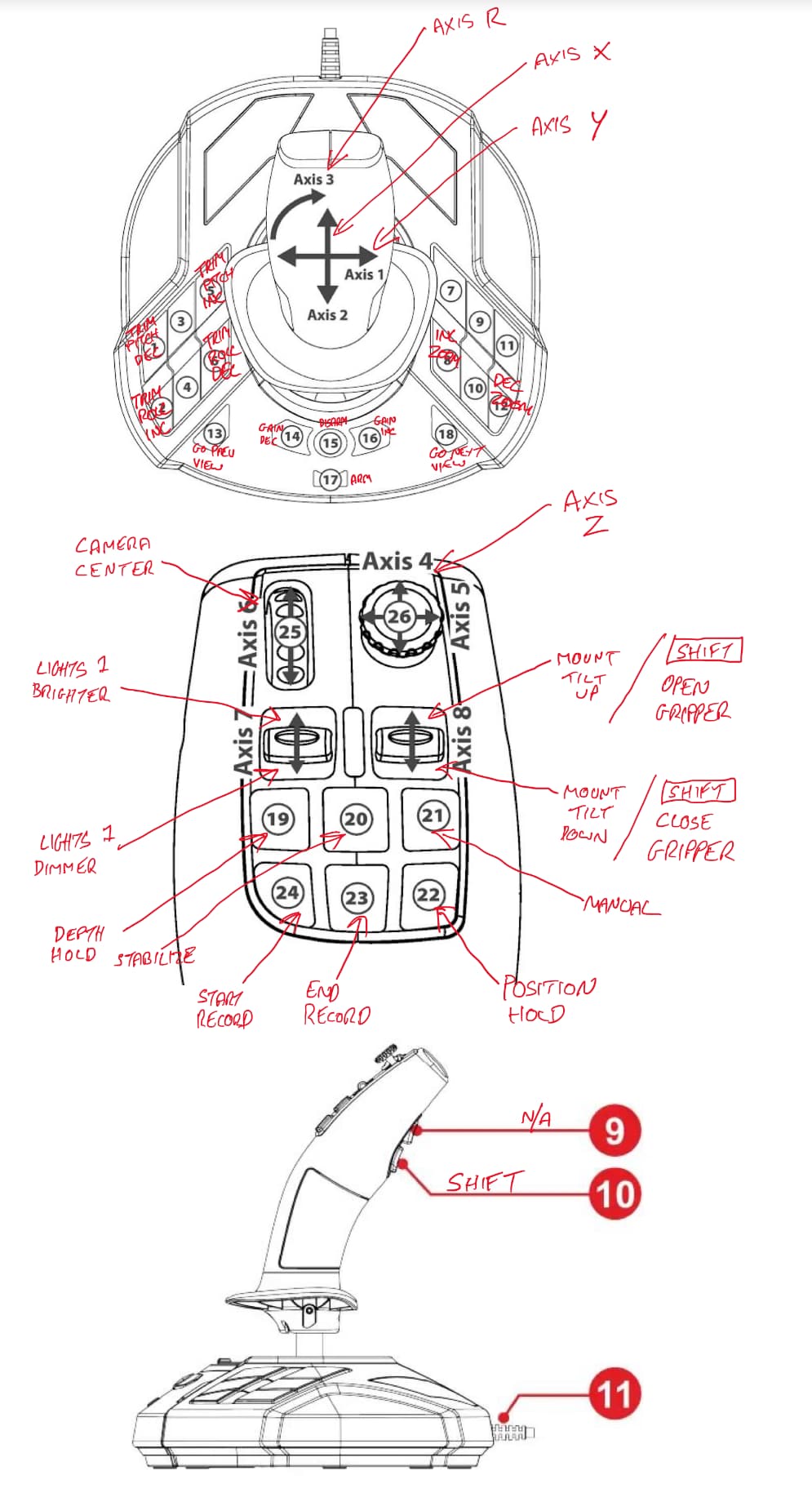
I have included the mapping file and picture of how it is mapped. Some changes may come after in-water tests but so far I like how it feels with most functions being accessible on the stick itself. Next stem it to add small lables to the stick.
The quality of this joystick is fantastic and I will make a leg mounting strap for when operated seated. Great thing with this setup is if you cannot use the joystick then the Steamdeck or XBox controller can be used.
Hi @Geoff87, thanks for sharing! 
Would you be open to creating a pull request for this in Cockpit, so the support can be built in?
I’ve raised an Issue about it here, if that’s something you’re willing to contribute 
In your diagram, it is a little confusing that there are two buttons marked as 9 (one on the right side of the top image, and one on the stick button on the bottom (side-view) image).
Hi Eliot,
That would be great as I think this is a fantastic stick for ROV operation. I have very little experience in coding or development of software unfortuntely.
The button marked 9 N/A does not show when mapping on Cockpit for some reason and I am not sure it that is because this stick if for Windows.
Later today I will add clearer images and a new mapping file here as I have made a few changes to allow fully control access directly from the stick.
Noting that there was some external discussion, and initial (non-visual) mapping support has been added for the Thrustmaster Farmstick, and is available as of Cockpit v1.17.0-beta.5