I have a BlueROV2 that purchased and put together several months ago. When I first put it together and ran the calibrations on it, all the thrusters were working properly. Then I set the rov aside while I finished other projects including building a workshop and water tank to do testing with the device. Well, now I’m ready to start testing the device in my tank and I’m trying to use the new Cockpit software. But I’m having two issues:
When I set the rov in the tank, and “Arm” it, it starts moving around in all directions. How do i get it to do nothing when i Arm it?
None of the joystick movements are right. How do I map the controls the way I want them? I’ve gone in the settings and tinkered with the axises, but that only made it worse. Do I need to modify a file?
Hi @TheCollector
Review the documentation- you can use QGC to calibrate thruster direction, but it’s also possible to do from the BlueOS interface, under vehicle setup / pwm outputs. Assuming your thrusters are connected properly and in the correct locations, once you have the thruster directions set correctly stabilize and depth hold mode should work fine. The vehicle shouldn’t be going crazy in manual mode, by won’t drive in the expected directions with the directions not set correctly.
Ok, I’ve rerun all the calibrations in both the BlueOS and QGC, and the device still starts moving as soon as I Arm it. Not in QGC, but it does in Cockpit. It’s like it just starts trying to descend without me giving it any instruction through the joystick. Is there some place in the Cockpit settings that instructs it to move upon Arming?
Hi @TheCollector -
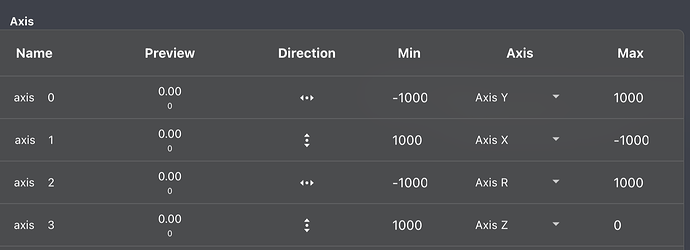
Ah - that sounds like you have the vertical axis of the joystick going between the wrong range. checkout this thread, and make your z axis range match the same 1000 to 0 range.
Thanks, Tony. My values were different. So I switched to yours, but my rov is still going nuts when i Arm it. Here’s my axis settings. Let me know if anything seems wrong.
I think the issue was with my z axis. I set its range from 1000 to 0 and it seems to be working. When I arm the ROV, it stays still. Now to figure out how to remap the controls to do what I want. I want one of the thumb knobs to move the nose up/down/left/right, and the other knob to move the rov forward, backward, ascend, descend. I think that’s all the movement controls I need.
Hi @TheCollector -
Axis R controls the Yaw
Axis Z is up and down
X and Y handle forward/backward and left/right strafe.
If you want to adjust the pitch, you would map buttons (maybe with shift) to pitch inc / pitch dec.
I’m not sure what you mean by moving the nose around otherwise!
Your screenshot shows AxisT - I’m not sure you’ll want that there?
Yeah, I just had T there temporarily while I figured out what was what. It look like I have to have Z mapped somewhere else the device spazzes out when I arm it. I tried using the Shift options but it looks like that isn’t something you can do for the thumb knobs. If you set an axis on the shift side, it puts it in both shift and regular.
So, unless I’m missing something, I am limited to only four axises since I only have two thumb knobs. And really I’m limited to three axises because I’m forced to put Z (a useless axis for me) on one of the knobs.
I’ll keep tinkering and see if I can find a way to get all the axises, I actually need, mapped. Thanks for your help Tony. If you’re ever in the central VA area, hit me up. I’ll take you out for a beer.
Ok, I’ve gotten all the movements working with the exception of Pitch. I’ve mapped it to buttons 12 and 13 on my joystick, but nothing happens when I press the actual buttons. Anyone know what could be causing it?
Also, where can I download the latest Ardusub firmware. I’m currently running 4.1.2. Maybe if I update that it will fix my pitch issue.