The leak sensor triggers the leak sensor board (steady red light), but never in the software, both BlueOS and QGC. If I disconnect the sensor from the board the red light goes away. None of the connectors are corroded or unclean. If I change the position of the sensor on the board it’s the same results.
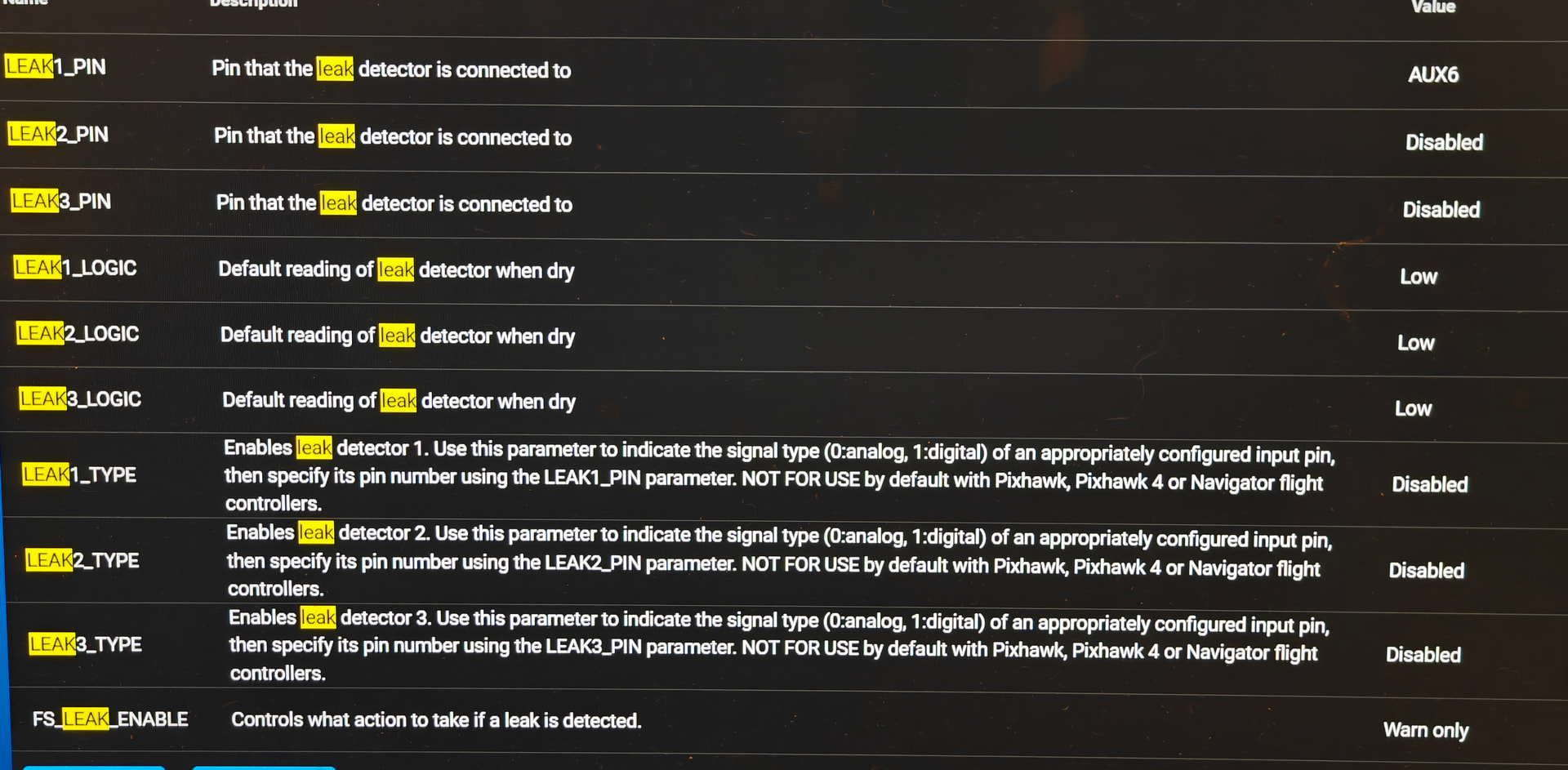
I have the leak sensor board connected to Aux 6 on the Pixhawk, with the ground towards the top. Parameter is AUX6. Logic is Low. Leak1 Type is Disabled (analog or digital produced the same results).
I have tried Aux 5 on Pixhawk and software, same results. Reloaded parameters, same results. Downgraded Ardusub to 4.5.5, same results. Power cycled the ROV, same result.
Thanks for reporting this, and sorry to hear you’re experiencing a problem with your leak sensor functionality.
Would you be able to save a parameters file from the BlueOS Autopilot Parameters page, and upload it here, so we can see if there are any issues, and try to replicate your setup / the problem?
It could also be helpful to try a substantially earlier ArduSub version (e.g. 4.1.2) to see whether the issue is still reproducible for you there. If it’s not then there’s likely either a configuration issue in your 4.5.x setup, or a bug has been introduced somewhere along the line that breaks the functionality. Ideally that could be narrowed down to a specific release with a binary search (i.e. repeatedly load the firmware halfway between the latest known working and earliest known not working version), but that’s also something we can do if we’re able to replicate the issue.
4.1.2 version had same results. Leak sensor board is triggering, but not in software.
Everything else seem to work. I had some minor light flicker, I don’t know if that could be due to a minor water leak I had.
It was through a thruster cable sheet, it didn’t show on the 15 minutes vacuum test, I had to keep the vacuum for over an hour to see any decrease. After putting about 3 psi positive pressure and spraying leak finder all over I found the leak.
If those were also your parameters then maybe there’s some other GPIO functionality configured on that pin (e.g. one of the relays), or there could be a problem with the pin itself (maybe try AUX 5 instead?).
I’m attempting to confirm 4.5.x works as expected too, but am having some issues with my Pixhawk failing to send most of its parameters, which I need to resolve before I can keep looking into this
The only differences I’m aware of are that the BRD_PWM_COUNT parameter doesn’t exist anymore, and SERVO14_FUNCTION should be set to the new -1: GPIO value.
EDIT: I managed to get past the parameter issue, and found that the leak sensor does work as expected, but the servo function does need to be set to GPIO, which is apparently not the default.
I’m currently looking into what we can do to mitigate+fix that, since obviously it’s not ideal for a leak detector to not be working by default on some flight controller boards.
That’s it, thank you. Servo14 as GPIO didn’t work for me in 4.5.x, but did indeed work in 4.1.2. It was probably not set as GPIO when I last tested in 4.1.x.
As a temporary dirty fix I had connected the leak sensor board to the rPi (GPIO17) and written a script using pymavlink to set leak flag. It worked, but I’m glad I can avoid that workaround now.
Glad to hear it
And thanks again for raising that it wasn’t working - we’ll likely have to change some systems and processes to make sure things like that can’t go unnoticed for extended periods.
This is concerning, as that definitely should work (and is working on my Pixhawk setup, as mentioned).
Does it work if you reboot the autopilot after configuring the GPIO pin? And if not, does it work if you set LEAK1_TYPE to Digital? That shouldn’t be required on a Pixhawk, but I’m curious whether there’s an issue related to the default handling or something…
For 4.1 and below Aux pins 5 and 6 should be configured as GPIO pins by default, via the BRD_PWM_COUNT parameter. That said, I suppose it’s possible you could have changed that while trying to enable some other functionality
I installed firmware 4.5.6. Successful install, but parameters never loaded. Errors from BlueOS below. Reboot didn’t help. Could be a one off, but unfortunately didn’t have time to try a re-install of 4.5.6 today.
Next: Installed 4.5.5 and parameters loaded successfully. LEAK1_PIN was AUX6, LEAK1_LOGIC was Low, and LEAK1_TYPE was Disabled. Leak sensor was not working. Next, tried your suggestions below:
Reboot didn’t work. Setting LEAK1_TYPE to Digital did work Leak sensor is working now and Cockpit announced the leak warning. If I disconnect the leak sensor and re-connect there is no second leak warning, but I guess that’s probably by design. Anyway the dive would be aborted.
If those warnings appear during a firmware installation (while there is no active autopilot available) then they’re not relevant. If they appear after the autopilot is supposed to be running then the installation may have failed, or there’s some communication issue that’s preventing the autopilot from talking to the manager.
Hmm, that’s not ideal, but I have just confirmed here that it does indeed seem to be required, despite going directly against what the parameter description says
Thanks for following through with those checks, and I’m glad we at least managed to find a workaround for your problem. I’ll continue investigating, and we’ll likely make an announcement soon detailing the extent of the problem and available solutions for affected users.
Failsafes indeed don’t typically reset themselves with time. You should be able to arm and disarm to reset them though (assuming the failsafe state has actually cleared), or reconnect the control station software.


 Leak sensor is working now and Cockpit announced the leak warning. If I disconnect the leak sensor and re-connect there is no second leak warning, but I guess that’s probably by design. Anyway the dive would be aborted.