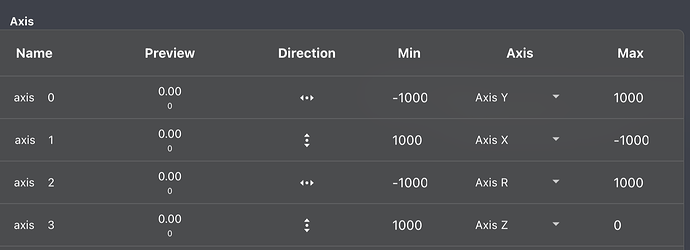
We are experiencing some unfathomable hiccups on our ROV. Two of our 5 x T200’s are going crazy when we arm the vehicle. We have tried what seems close to us, meaning:
Nothing wrong with joystick nor sticks on joystick, we bought a new one and still experience the same uncalled for thrust.
We have looked over the settings for “center stick is zero throttle” vs “full down stick is zero throttle”.
The vehicle is in manual mode, no stabilizing nor depth hold.
We have monitored the PWM values from SERVO_OUTPUT_RAW (MAVLink in Cockpit), and they are the same as the thrusters (maybe obviously). 1500 pre-arm, and around 1700 when we arm. We therefore localize the problem within the autopilot. Any clues?
What channels are the two thrusters connected to? They should not go to 1700 after arming in manual mode, unless their trim point has been incorrectly adjusted? Check the PWM output page in Vehicle Setup in BlueOS to see and set trim point to 1500.
All thrusters are connected to the normal channels, PWM 1-6 on the Navigator. Trim point has not been adjusted, it is set to 1500. Min is 1100 and max is 1900 like usual.
Hi @Erlingns95
This really sounds like it would have to be a problem with your game controller. Have you performed the calibration process within QGround Control?
You’re not trying to run Cockpit and QGC at the same time correct?
How does Cockpit display the position of the joysticks in the setup menu?
If you could share a .BIN log, we might be able to see what is wrong if this is truly a problem on the vehicle, but I suspect it is with your surface equipment…
We have calibrated the controller, and we are not trying to run Cockpit and QGC at the same time.
Cockpit displays the joysticks in center position.
We will try to supply a .BIN log, hopefully the upcoming week.
To make sure, we have to run the sequence (run BlueOs, arm the vehicle) for the .BIN log to record the useful information? As i understand it, it will define if the signal comes as an RCIN from the controller or just an RCOU from the autopilot? (like a black box?)
We have thought about flashing the SD-card and starting the config. over. This will only help if the origin of the problem is inside the onboard computer, right?
No need to “run” BlueOS - I assume you mean open it in the browser, as it is always running if the vehicle is running- it hosts the autopilot process! Simply arming the vehicle starts a log, and disarming stops it.
The BIN log should show us outputs vs inputs, yes, like a black box flight recorder.
You’re correct, reflashing BlueOS is likely not necessary, and would lose the opportunity to potentially find a lurking bug!
Those logs are quite small, and have names listed as if you didn’t click “allow” in Chrome to download them properly? That extra step is typical of many downloads in BlueOS… I was able to open them - they show nothing particularly unusual on the input or output side of things… I do see a brief moment where the output for channel 7 and 8 pulses to full power, is this what you experienced?
This looks to be a standard 6 thruster ROV, vectored frame type?
You configured PWM output 7 and 8 to be motor 3 and 4, respectively - are these the horizontal thrusters that “go crazy” when you arm in manual mode?
I cannot comment on the size of them, as it was not me who “made” the logs.
Although it does make sense that they are small, because we only turned it on, armed and pulled the log to supply it here. Test was also done on land, so I imagine the guys only kept it armed very briefly before disarming again.
It is a SimpleROV 5 setup, meaning that thruster 3 & 4 are the vertical ones.
We have similar logs showing that RCOU3 & 4 do the same as 7 & 8 here, when the thrusters are connected to PWM output 3&4.
Are you controlling the vehicle via Cockpit? This happens with both it and QGC?
I suspect your vertical joystick axis may not be setup correctly - can you send a screenshot with a controller connected, in the game controller menu with “table” view selected? It should look something like this:
Can you try another game controller? That one may be damaged as it is registering quite a lot of displacement on axis 3 (z) - I assume with the stick centered? I’ve only seen them do that after getting wet…
Hi, I´m part of Erling´s team. We have tried another controller, but the results are the same, further to attached bin file. One observation of the value in the preview column: it is the average between the min and max value. That is if I set the min to 1000 and max to 500, it displays 750.
This statement is correct, but input channels 7 and 8 are unrelated to vehicle motion, so it’s drawing a false correlation.
The controller does not directly control individual thrusters - Cockpit converts controller inputs into commands for motion axes (which then get internally handled as overrides of the corresponding radio input channels - generally the first 6), and then the autopilot distributes those across the frame motor factors, into corresponding servo output channel values that get sent to the ESCs to control each motor.
For Sub vehicles input channel 3 normally corresponds to the vertical axis, which matches the behaviour you’re seeing (though that unfortunately doesn’t tell us why that channel is getting a non-zero input). Technically the input channel mapping also happens in the autopilot, so if you were using the input hold functionality then that could allow zero joystick input and non-zero perceived joystick input, but that should reset when you restart the autopilot…
It may be helpful to see what values Cockpit is sending in the MANUAL_CONTROL MAVLink message (which is how it communicates motion commands to the vehicle). You can view that via the menu Tools / MAVLink and seeing what the Outgoing Messages field looks like.
We tried swapping the PWM inputs from 3&4 to 7&8 to check if it was the physical inputs on the Navigator that was causing the problem. In this case channel 7&8 was configured to be vertical motion, instead of 3&4.
We have also tried adjusting the Servo3_TRIM, i think this is the case here. Did not help, by the way.
To summarize:
We have tried different joysticks, one which was brand new out of the box.
Joystick calibration done multiple times.
We are sure the vehicle is in manual mode, confirmed by widget and MAVLink.
We have tried “undoing” an old input-hold-set, not our problem either. As you say this should be reset after a reboot, but we tried it anyway.
We have swapped the physical inputs on the Navigator, problem follows (moved thruster 3&4 to 7&8).
We do see an offset/deadzone//displacement in the “Joystick configuration” page, on Axis Z. This is hard to explain, for us. See comment above made by Ragnvald - Algetun, and mine just above.
This photo shows the outgoing messages from what you requested. Shows the same as the joystick config.
Is this the point where we flash the SD-card and hope it clears or ghost-problem? Or do you want to help us a bit more and maybe learn something along the way?
It’s important that you try the last point mentioned by @EliotBR in his message:
Open /menu/tools/mavlink
Click on the MANUAL_CONTROL message to monitor it
Check if Cockpit is sending anything besides 0 (or close values) on the axes (x, y, r, z, s and t)
Click to arm the vehicle
Check if there was any change in the values that are being sent
If the axes are all zero or close to zero, it’s mostly sure not Cockpit what is causing the motor spinning. The numbers we are seeing in the logs (1400) would require a value of around 25% in the axis, so 250 (or 125 on Z).
The Navigator has no PWM inputs - are you talking about the outputs?
I was saying that the “RCIN” input channels are not mapped directly to the “RCOU” servo output channels. The naming is a bit confusing, but input 3 is for commanding vertical motion, and the outputs are whatever you’ve configured them as (e.g. output 3 might be configured as a horizontal thruster, completely unaffected by input 3).
The problem is with the input (command) - servo 3 is an output (motor), and one which you may not even be using (so trimming that output is irrelevant to this issue).
If it does happen to be an autopilot configuration problem you can try resetting the parameters in the BlueOS Vehicle Setup page. It’s very unlikely BlueOS itself is the problem, so reflashing the SD card shouldn’t be necessary.
At the moment it’s still unclear where exactly the problematic offset is coming from, so if it’s not a problem for you to reset the parameters then that’s likely a helpful next step. You can save the current parameters via the BlueOS Parameters page first, if you’d like to facilitate further investigation should that end up resolving the issue, but the parameters are also already stored in the .bin log files.
If that doesn’t solve the issue then it’s likely an input problem, in which case the outgoing MANUAL_CONTROL values (once you’ve re-set the Z axis input range to 0-1000) will be the next thing to confirm.