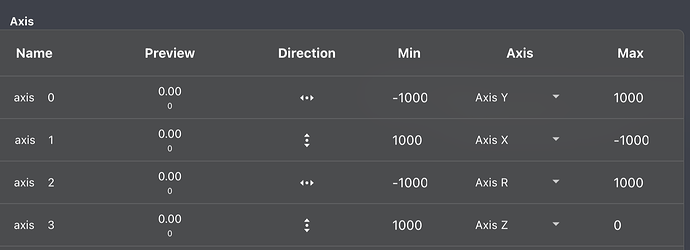
When you say “motor expect 500 on Z for idle state”, is that not the same as the preview column? In that case, what does @tony-white mean when he says it should look something like 0?
No problem, I understand the confusion here. Let me explain:
Your joystick axis go from -1.00 to +1.00, and can have any value in between. When it’s resting, an analog stick will be at value 0.00 (or close, since the hardware is not perfect, so this is usually 0.00 ± 0.05).
Cockpit allow mapping those values to something else, so the autopilot can understand. ArduPilot’s vehicles usually expect values from -1000 to +1000 on all axes, but ArduSub specifically expect +1000 to 0 in the Z axis.
As the analog is sitting in the middle, for all axes, idle is 0 (middle between -1000 and +1000), but for the Z axis, the middle is actually 500 (middle between 1000 and 0).
In the screenshot that you sent, in the “Preview” column, the value on the top is the joystick value (-1.00 to +1.00), and the value below is the mapped value (so it depends on the Min and Max that you set for the mapping).
The mapping from @tony-white is right, you should copy it, so basically replace the 500 in the Max of the third axis (Z) with 0, so the idle state (middle) is 500, not 750 (middle between 1000 and 500).
Thank you all very much for your help in this matter. We now have a solution that works. For some reason the frame configuration changes. Our approach is reset all parameters, select the correct frame, reboot, calibrate accelerometer, gyro, and compass. Then we can arm the unit without any thrusters starting on their own. We will be happy to upload a number of bin files if you would like to investigate into the matter further. For now, at every we check the frame configuration, yesterday, it changed +2 times “on its own”.
By reboot, do you mean restart the autopilot or power cycle the system?
What version of BlueOS are you using? Could it be reverting to an earlier version, or does the boot-strap version in the lower left match the installed version?
Sharing system logs from the lower left settings menu in BlueOS would be helpful, a well as bin logs that correspond to bother when the problem exists and when it has been corrected via your workflow.
We have had similar problems with a BlueROV2. The issue is intermittent but now means the ROV is too high risk to operate as we have some other expensive kit installed on the the BlueROV which we do not want to damage. Where would you suggest we start with troubleshooting. This continued even after an SD re flash which we had to do to fix another issue anyway. We have also had the BlueROV camera moving on its own. Suggestion was loose wiring - would you conclude the same? What was the solution for thrusters going on thier own without controller input on this thread?
As noted in the post you replied to, knowing what software versions you’re using, and getting both .BIN log and BlueOS system log is the best information to begin investigating what might be going wrong.
Loose wiring doesn’t typically result in a servo-style pwm signal causing servo or motor motion, but it could theoretically? We’ll check the logs to see if the output channel values for the tilt servo are changing - if they’re not, something is wrong with the servo or the wiring. If they are, and the pilot input is also changing, then you could have damaged game-controller buttons (seems more likely to me.)
Typically thrusters going without user controller input is a controller configuration problem - or you’re just in a mode like Stabilize that is running thrusters to hold orientation - best to verify things stay quiet in Manual mode (about the only time I use it! haha.)