Ping360 mapping in ROS

Hi there. I am trying to mapping our small water pool in ROS by point cloud data published by Ping 360, but I get some trouble.
First, I download the code from ping360_sonar/src/ping360_sonar at develop · CentraleNantesRobotics/ping360_sonar · GitHub, and run it in ros as a driver for Ping360. It works well and I can get the data including angle and distance from topic in every frame.
Then I just transform the angle and distance data to point cloud data in ROS program, which will be published in rviz, and we can see the result below.


It preforms good but far away from real world. As comparison, I provide the real pool image and point cloud result scanning by lidar.


I thought the difference was caused by the inaccuracy of the sonar, but soon I notice it achieves a really good result in ping viewer, which shows sonar can mapping the edge of pool specificlly.

Therefore, I realized that the difference may be caused by incorrect processing on the point cloud data.
So I wonder:

  1. How to calculated the point cloud position from the distance and angle data published by sonar. You can see my code below.
  2. The max angle of Ping360 is 400 or 360? I set the max angle is 360 but the default setting is 400, it may influence the final point cloud position.
  3. Where is the start angle (0 degree) in Ping360, does it begin at 0 degree everytime I start it?

    Also, I have provided the code, please see if there are any errors. Thank you for your patient answers!
    Launch file to set the max angle and other parameters:

    Sonar mapping program to publish point cloud data:

    Topic from Ping360:

Hi @Alex001,

I don’t have experience with the ROS driver, so I’m not sure how it’s handling the Ping360’s profile data. If it’s not taking account of changes to the vehicle orientation and position then each output point will be relative to the Ping360’s pose at the time it was taken, so different points aren’t necessarily in the same coordinate system.

For reference, PingViewer corrects for Ping360 yaw rotation using the vehicle’s orientation data that it provides in the MAVLink telemetry stream.

The Ping360 outputs profile data that is relative to the device, and has no concept of

  • where the device is
  • how the device is oriented
  • which response strengths correspond to object reflections
  • the speed of sound in the transmit medium

all of which are relevant for generating a point cloud, and need to be determined from external data / provided by the user.

The device_data message the Ping360 uses to communicate its profiles uses gradians for the transducer head angle. There are 400 gradians in a full circle, so most likely your code should be using 400 for the maximum angle, unless it’s doing some internal conversion between degrees and gradians.

The 0 angle for the Ping360 transducer head is at the back, where the cable enters the device body.

Hi @Alex001 , Im also thinking of using ping360 to do underwater mapping. Just wondering if you have managed to improve accuracy of the point clouds from your previous post. Any help would be appreciated!! Thank you.

Hello,
I’m looking for some guidance in setting up my ping360 correctly.
My setup is:
Ping360 sonar
ROS2 (Humble)
An altered version of this ros driver: GitHub - CentraleNantesRobotics/ping360_sonar: ROS package for Blue Robotics Ping360 Sonar · GitHub (the driver is setup for Foxy but I’ve had no compatibility issues)
A motor driven rail that moves the sonar 50mm between logging scans (the code waits until the next scan after stopping, so scan is completed while stationary).
The tank I’m working in is roughly 6x3x2m LxWxD and the water is rather murky.
The sonar is positioned about 600mm from the surface, at 45 degrees.
I have been playing around with the sonar settings but cant get any clear readings.

Here is the pointcloud that gets generated, the signals that get picked up closer plot straight, but the ones further away (that i think might be echoes, not sure) trend upwards at like 45 degrees.

Any insight into this and some recommendations for sonar settings for working in a metal tank filled with murky water would be appreciated.
Things like high vs low frequency, transmit duration, gain, etc.

Hi @LachSR, welcome to the forum! :slight_smile:

Blue Robotics don’t develop or maintain that ROS package, and I don’t believe any of us have experience with it, so the relevant support we can provide is predominantly conceptual. Other community members may have additional insights.

Have you tried using the Ping360 in its recommended form, via Ping Viewer? The interface there should show you the full sonar profiles, which will give you a sense of the scan clarity, which you can then optimise by changing the scan settings (and then copy them across to your ROS approach). At a minimum that should involve reducing the scanning distance to the maximum you want to reach in your tank, which Ping Viewer will then automatically use to adjust some of the other scanning parameters.

Given the angle you’re operating at, it may be best to keep the scanning sector in front of the sonar, to avoid scanning upwards towards the water surface. Alternatively if your water is flat enough you could just treat it as a mirror, and factor that in to where the returns are measured.

Water murkiness should typically not be a problem, unless it’s caused by large clumps of organic matter that contain substantial density changes from the surrounding water (in which case the transmitted pulses might suffer from extra backscatter and attenuation as they travel through the liquid).

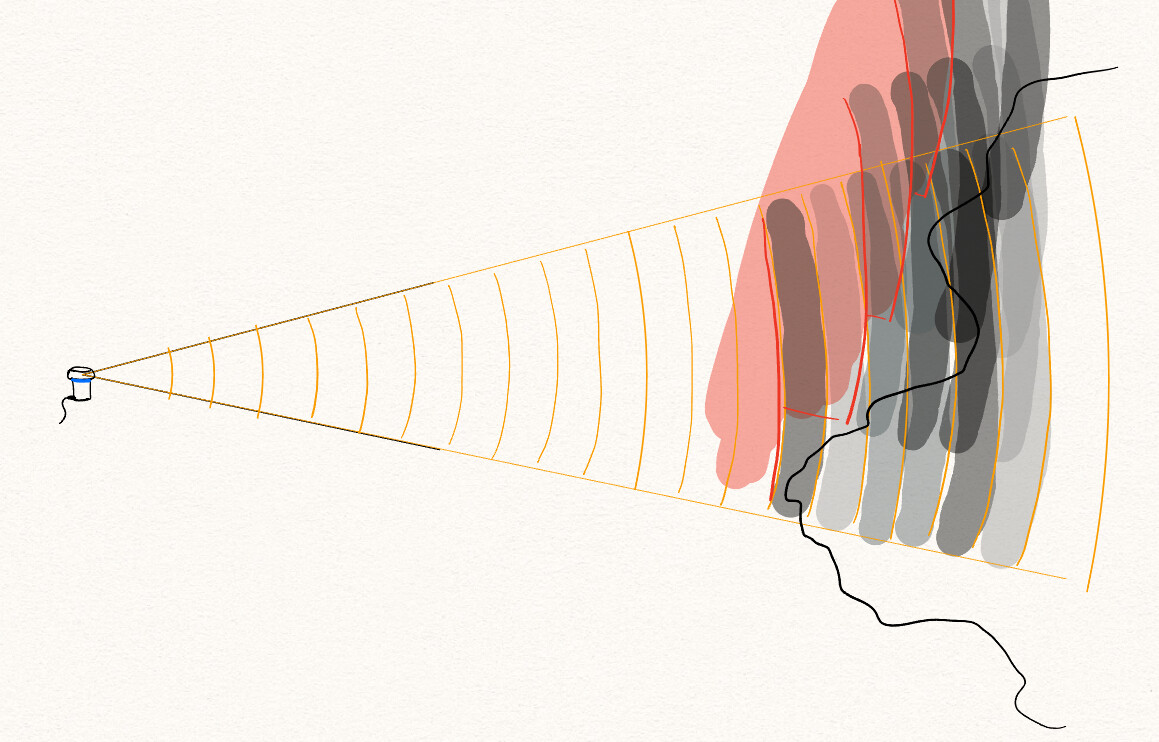
It’s worth noting that compressing beam responses directly into a point cloud may not be very accurate, especially at longer distances (where the beam has had a chance to spread out a fair amount).[1] I understand point clouds can be convenient to work with, and require minimal processing to generate, but if you want some extra spatial resolution you might want to try considering each profile sample as multiple 3D gaussians (based on the orientation, beam size, sample duration, and return strength), then construct a surface estimation based on the density/correlation of their overlaps (and/or render them directly as gaussian splats, if you mostly care about the visuals).

I’m not aware of anyone having done that before, but it seems potentially well-suited to your application - especially given you have a fixed orientation and constrained mounting (so don’t need to account for rotations of a vehicle, which can be hard to measure accurately enough).


  1. I presume you’re doing this using distance estimates, from a peak finding and thresholding algorithm? ↩︎

Hi Eliot,

Thanks for the reply.
I have rotated the sonar to face straight down 90 degrees and fiddled with the settings some more and have gotten a better result, however I’m still getting this ring appearing on the scan image, do you know what might cause this (circled in purple).

Also the Gaussian suggestion seems interesting but I don’t know a lot about them, do you mean representing the returned point as like an area of the whole slant range of that sample?

Given it’s a ring (i.e. not direction dependent), it’s very likely from something physically connected to the sonar. How have you mounted it to the bar? It’s possible the transmitted pulses are ringing through the chassis of the sonar, into the bar it’s mounted to, then bouncing back from the edges of the bar and appearing as a series of equally spaced rings.

The core idea is to actually factor in the beam width and profile sample return strengths, then combine the regions of high response into the predicted surface, rather than just compressing each profile into a single distance estimate and creating a surface estimation from those points.

In the following profile, is the surface at the first strong response, or at the strongest response, or somewhere in between?

There isn’t necessarily a correct answer, and especially not one that generalises well to every individual profile.

The beam width is non-negligible (especially as compared to something like a laser, from a lidar scanner), and the spread can be simultaneously unhelpful for understanding where exactly the surface is, as well as very helpful for blocking out a large region where it isn’t.

Consider the same scan with the sample return strengths, and in the context of some profiles that came before it:

The red regions had no response, so the surface isn’t there, and then the dip between the two peaks can potentially be detected using the regions where there are consistently strong returns between the different profiles. At the cost of some extra processing, the same scans can be combined to give a higher resolution, more accurate map of the surface.

In terms of actually implementing that, 3D Gaussians are seemingly a nice solution for modelling the spatial, density-like nature of the samples, particularly because:

  • they can be stretched and arbitrarily oriented in space, which makes them well-suited to filling out slices of a beam,
  • they have smooth boundaries, which matches the non-hard edges of the sonar beam, and allows easily adding up the effects of nearby gaussians without complex inclusion checks
    • given they are functions of density, you could also specify negative densities for the regions where there was no response from a sample
  • it is possible to fit a small set of Gaussians to approximate a larger set, which can avoid the need for explicit merging and/or culling when reducing a set of samples to a more manageable representation of the combined space
  • they are defined about a central point, so region inclusion checks (e.g. when dealing with large numbers of Gaussians that have been limited to a maximum spread) can be performed efficiently using structures like octrees
  • they can be rendered directly, using Gaussian splatting, which can (for some applications) avoid needing to generate a mesh to represent a surface (as would typically be required from a point cloud)

I would like to consult: why do I only get sonar images but no point cloud maps when running this ROS package? Are there any settings required for this?

Hi @away -
Welcome to the forums!
As Eliot has explained in this thread, because the Ping 360 is an acoustic device, not a lidar, it does not generate a point cloud!

Thanks for the in-depth reply.

The ringing from the mounting bar is a real possibility as I didn’t add anything to dampen that.

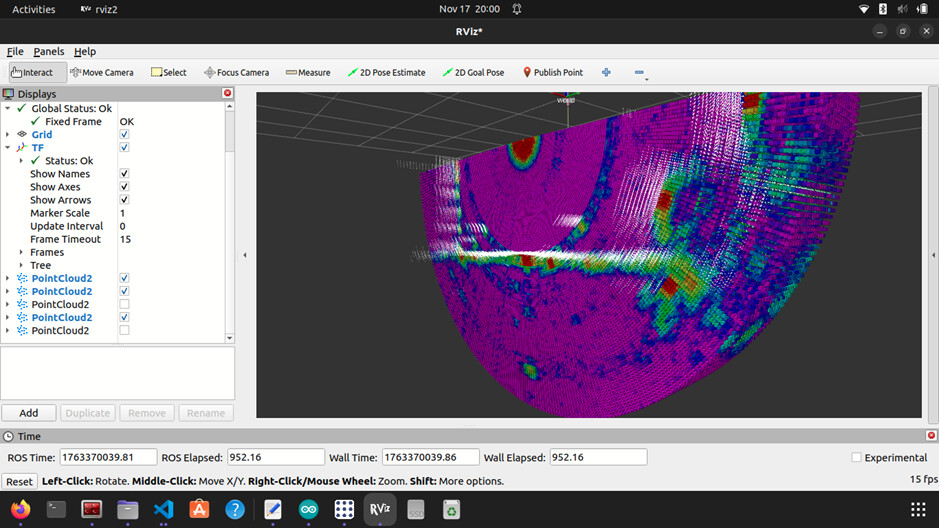
As for the Gaussian suggestion, I ended up implementing something to this effect. I calculated the dimensions of a spherical patch at the scanned distance and filled the patch area with points, similar to the Gaussian, to avoid compressing the scan into a single point.

That is as far as I’ve gotten currently. I might finish the post processing part in the future like you suggested with the red sections eliminating what is and isn’t there for more accurate modelling.

Also, I found saving rosbags in intensity point clouds like this (second image posted below) helpful for post processing, in case anyone else is looking to do something similar.

Second image: Intensity point cloud mapping