Feeling lost at sea with Python? Does developing a BlueOS extension feel like navigating stormy waters? Fear not, we’ve got just the guide to keep you sailing smoothly!
Whether you’re charting a course through solar power, cellular communications, or using other payload devices, this guide will help you harness Node-RED to reel in, process, and display your data with ease. No more drifting through common issues—like keeping your serial devices anchored to the right ports or getting tangled up in data processing. With this guide, you’ll sail straight through to a fully functional Node-RED dashboard!
We’ll show you how to log and sync your payload data with autopilot telemetry, ensuring your data is shipshape and even ready to view live in Cockpit. Creating live dashboards displaying your data is roped in as well!
The best part? We’re offering a pre-built flow to get you underway! With regular updates planned, this flow is like your trusty compass, guiding you through new devices and integrations. Just import it, and your Node-RED web is ready to customize to your application!
This forum thread will be your harbor for all things Node-RED and BlueOS. Got questions, need help troubleshooting, or want to share your latest discoveries? Drop anchor here, and we’ll keep the conversation afloat! Whether you’re a seasoned software captain captain or a first-time robotics-deckhand, let’s navigate these waters together!
Dive into the guide now, and let’s go on a BlueOS data acquisition adventure!
Ahoy Tony and Blue Robotics. This is really awesome! Thank you for bringing Node-RED into the toolset and developing an initial flow. Node-RED is a great tool to easily process data and quickly generate dashboards, etc. We’ve previously used it on an RPi 4 for ingesting and processing data coming from an Arduino LoRa radio transceiver to generate real-time charts/graphs. We are just getting started with BlueOS and Cockpit, and it’s exciting to see Node-RED a part of all the new BR development going on.
I am having difficulty downloading the Node-RED extension.The following is how I have Blue OS set up with my Mac Mini (using WiFi on my local subnet for Internet connection and ethernet to the RPi for video connection.
When I click on the Extensions tab, I never get a connection to the Internet.
I think this is related to a similar problem I’m having getting the video to stream via Cockpit.
I get video from the DWE USB camera via the ethernet using QGC as shown:
I don’t get a connection to the camera via Cockpit.
Am I missing some basic network setup that will make both allow access to Extensions and the DWE USB video via WiFi? I do have a BaseStation available and have set that up, connected it to a Windows laptop with the Cockpit App installed, but am having the same problems there.
Hi @rsheffield99 -
Cockpit by default only allows the 192.168.2.2 IP address to send it video - to receive video from the vehicle over WiFi, via the mutual connection of your computer and the Pi running BlueOS to the same WiFI network, you need to add the vehicle’s IP address to the allowed video IPs, as discussed here.
Have you connected BlueOS to WiFi via the wifi icon in the upper right? The vehicle’s internet connection is not the same as your computer’s…
The BaseStation provides a link between itself and the BlueBoat. To use that link you need to connect to the BaseStation’s WiFI network, or connect a USB C cable from it to your computer. Have you followed this documentation?
Your BlueOS screenshot shows it’s connected to your wifi router, but the little globe icon to the left of that shows it’s not connected to internet (or at least, not to the servers it needs for BlueOS’s Internet-related functionality).
Do you have some kind of firewall / network protections on that network that might be stopping it? It might be worth trying a different internet connection (e.g. a cellular hotspot from a phone) to see if that works properly.
It is highly unlikely that there is a firewall or other issue.
I have dozens of other devices hooked up to the Internet via this router.
I even have booted this same RPi with a standard OS disk and connected to the Internet.
I did, however, try out your suggestion of setting up a hot spot with my iPhone.
I was unable to connect to the hotspot and it took some time to reestablish connection back to my WiFi router.
Could it be that the ethernet connection I am using to my Mac mini could be taking precedence over the WiFi and disabling the Internet access?
I did try disconnecting the ethernet connection, but the WiFi didn’t come up at all.
Took quite a while for the ethernet connection and my local WiFi to show up once I reconnected and rebooted.
I find it extremely odd that QGC finds the RPi running Blue OS and shows the video over ethernet, but that does not work with Cockpit.
The really vexing problem is that I can’t download Node-RED or the cellular extensions I need to continue developing.
Hi @rsheffield99 -
I notice in your BlueOS screenshot that the video stream is not running, and showing a preview?
I’m a bit confused on how you’re connected to your BlueBoat… Is the Ethernet connection temporary, from pi to computer directly?
It looks like both QGC and Cockpit aren’t connected to the vehicle, potentially because the autopilot process itself isn’t running- as indicated by the broken heart in BlueOS…
If the autopilot process isn’t running cockpit won’t show telemetry or let you select from available video streams… Can you share a screenshot of your autopilot firmware page?
As for the Wi-Fi issues, when trying to connect to your hotspot were you loading BlueOS from the Ethernet IP address? Your Ethernet connection likely isn’t providing Internet to the vehicle, but you can adjust the priority of connections used to reach the Internet…
It’s worth noting that QGC is incapable of finding anything- it’s showing video because the default route is targeted at the expected port and IP address of your control computer- 192.168.2 1. Cockpit does not use a mavlink endpoint like QGC does, but should discover and connect to vehicles on the network regardless…
Tony, thanks. This is a standalone RPi that I’m using for s/w development. It is not the full Blue Boat.
I do have a Pix4 unit from an old Blue ROV that I can hook up, I just haven’t done that. If I need to do that to unlock the telemetry/video selection, I’ll connect that as well. That is very helpful info.
Changing the priority of the network connections is exactly what I am looking for and will try that.
Hi @rsheffield99 -
Do you have a Navigator connected to this pi? Without it the autopilot process won’t run and you won’t get a vehicle to connect to! Using a pixhawk may work but we’ve not tested rover in this configuration as the BlueBoat has always used the Navigator!
The Navigator is in the Boat, which is being used for other purposes. I will try my PixHawk out of the Blue ROV. If it doesn’t work, I’ll order another Navigator module. I suspect I will need to flash the PixHawk as well.
Tony, I cannot seem to get the dialog to pop up that allows changing the priority of the connections. It looks like I am connecting via the ethernet on the DHCP 192.168.2.2 address, even though I set a static IP address to be on my local network of 192.168.1.200. I can run a WiFi tool and see that the RPi is set to 192.168.1.101 on my local network. I just can’t seem to get the wlan0 set to use that address. In fact, wlan doesn’t even show up in the list of connections to select. I could really use some advice on how to reach the Internet. I did use my iPhone and successfully connect via it as a hot spot, but still did not get an Internet connection.
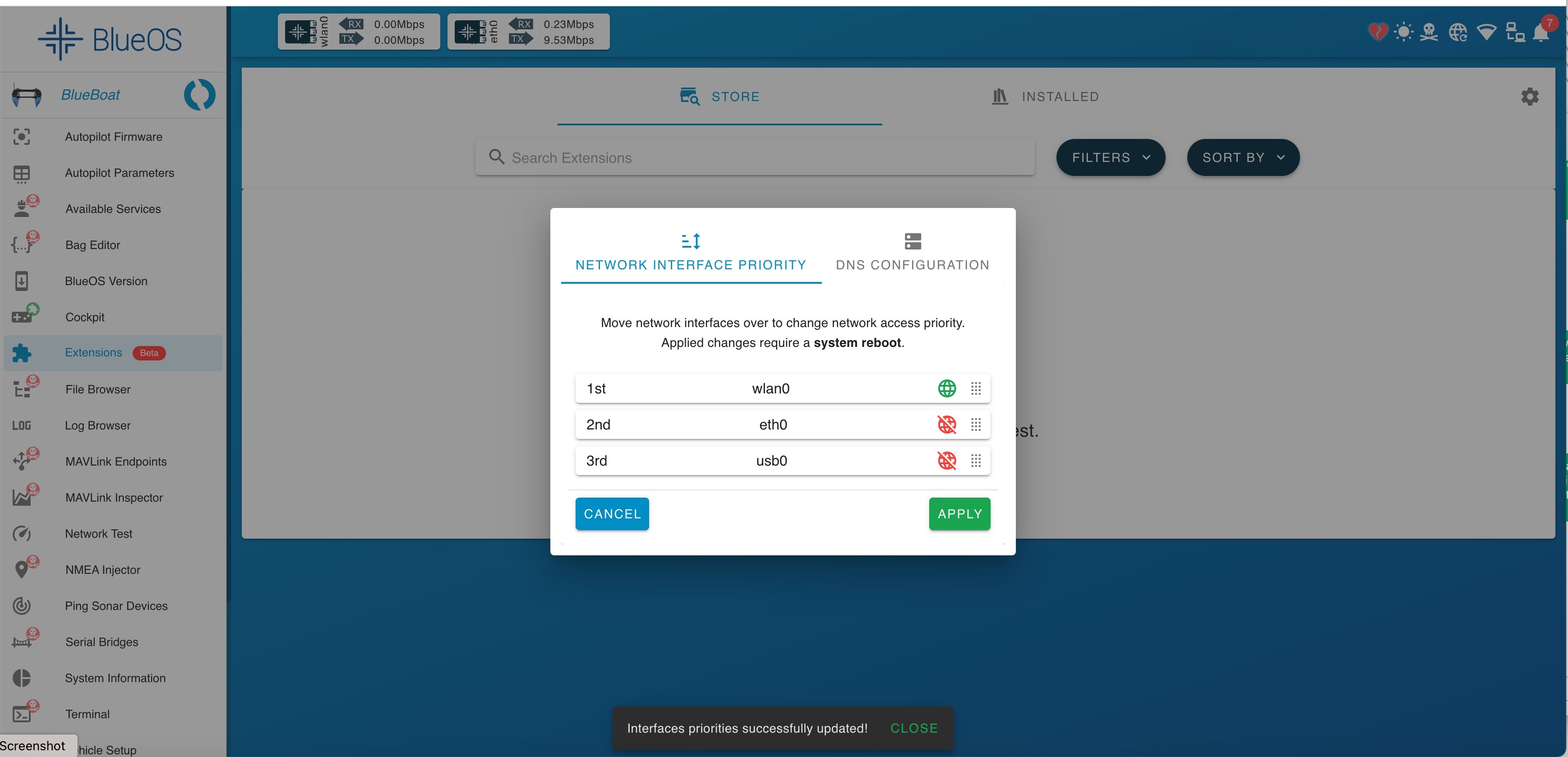
You’ll need to enable Pirate Mode (by clicking on the happy robot icon in the header bar), after which clicking on the globe internet icon will open the popup to change the priority of which network interface is used for BlueOS to try to connect to the internet.
Thanks, popped the dialog, but it already has my local IP network selected (and indicates access with a green globe) however, the icon in the header is still broken. And, of course, access to the Extensions Manifest fails.
In case it helps anyone in the future shorten their troubleshooting; I found the Lua script won’t run unless the SCR_ENABLE parameter is set in autopilot.