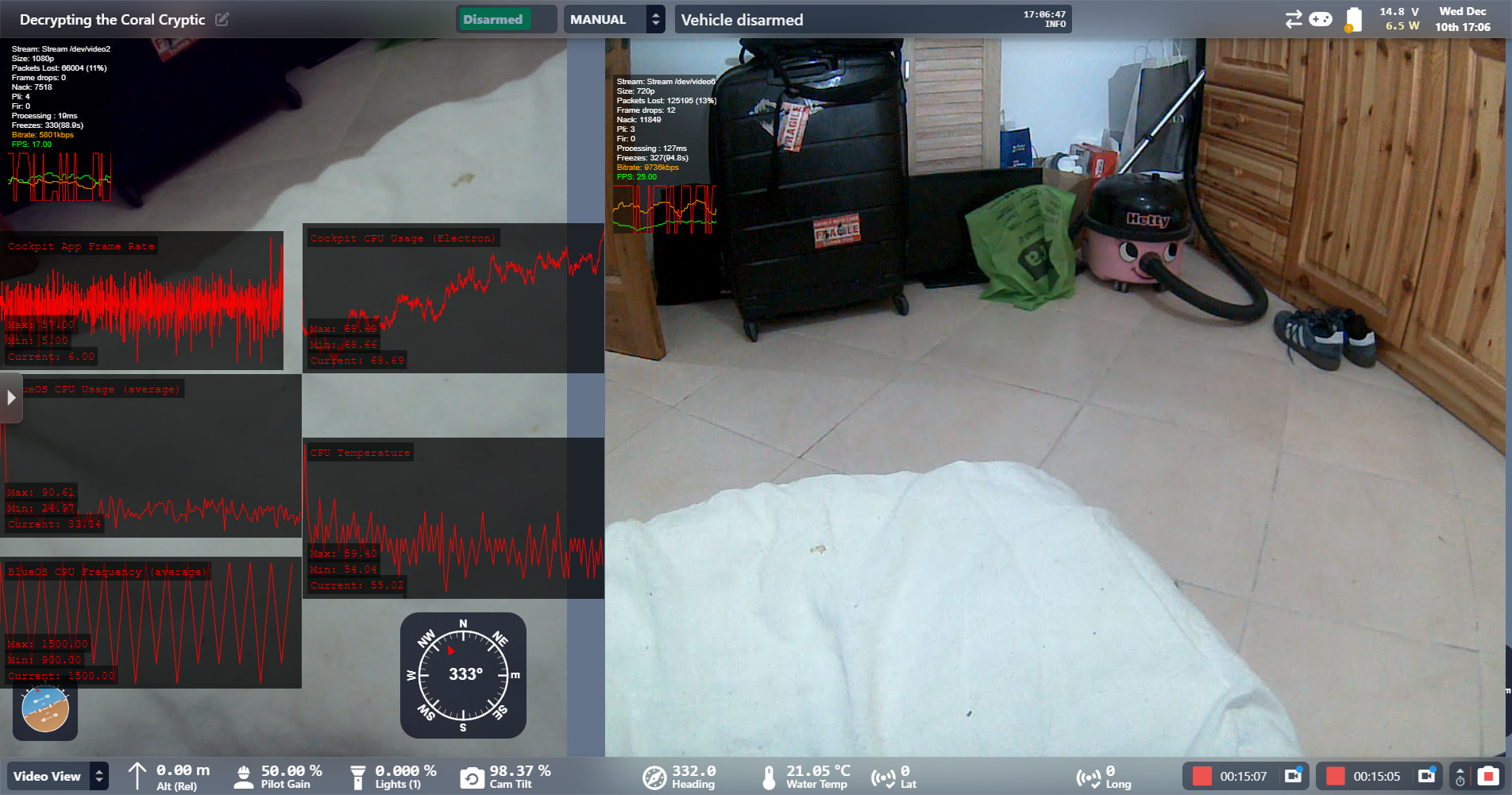
Issues with the video streams in latest version of Cockpit V1.170

Hello

I downloaded Cockpit V.170, last friday as instructed by BR technicians. on land it seemed to be working great, today I did a wet test, (I have two cameras, the normal BR ROV camera and a DWE camera)

Flying the ROV was ok both cameras streaming ok , when I went to try the record on stearm #2 and also snap shot pictures after a few minutes of recording, I kept getting “The video output file is not growing. This can indicate a problem with the recording, I stopped recording and snap pictures and video stream was back to normal , I tried recording stream on its own and still kept giving the same message VOPF not growing.

I came back home with the ROV and tried a few more times , but always the same message appeared, and now both video streams are stalling or freezing, and also the ROV connects and disconnects …vehicle lost connection… Mission download failed… No recent alerts, unable to arm the ROV (shows disarmed ) but if I press stabilize mode, the motors start.

I have reinstalled Cockpit V1.170, tried on three different computers, two different tethers and two different FXTI surface controllers, cleaned my computer with CCleaner, defragmented my disk and disk cleanup, but still the same issue.

Tether Diagnostics are 88 TX and 76 RX ( same as they were last week before all these issues happened).

I am recently new to cockpit , but had an online meeting with BR technicians last week when the were able to resolve some GPS streaming issues , and all was ok until I tried recording today during the wet test and afterwards.

(left my the ROV on for 15 minutes to see if it would settle down , but just checked and the main ROV video feed is black= no video stream)

Please advise

Just to make sure, looking at the video recording file after the warning, was it indeed not growing (or not even generated)?

From the problems you’ve mentioned there’s a high chance the problem is actually in the vehicle.

The “ video output file is not growing" warning is there indeed so you know when something is going wrong. It is a monitor that is always checking if the video recording file is growing, and warns you if it stops growing at some point. This warning has a 15s cycle, so it means your video recording has not grown in the last 15 seconds.

The warning matches the stream freezing/stalling, vehicle disconnections and mission download fails you’ve mentioned. From those, assuming your tether is fine, my main guess is that your vehicle is experiencing high CPU usage or CPU temperature issues (which lead to CPU throttling, making all processes slow down).

Could you check your BlueOS page while those events (stream freezing, growth warning, vehicle disconnection, etc) happen? We should be looking specifically at the System Information page on BlueOS, where we can see CPU Temperature and Usage. You can also right-click the top bar of BlueOS to add a CPU widget, that will tell you whenever you’re on BlueOS if your temperatures and CPU usage are normal.

Also, could you tell us which version of BlueOS are you running?

1 Like

CPU Cortex-A72

cpu0: 22% (1500MHz)
cpu1: 16% (1500MHz)
cpu2: 24% (1500MHz)
cpu3: 19% (1500MHz)

Temperature

Temperature

cpu_thermal temp1 65.2ºC, Max: 65.2ºC, Crit: 0.0ºC

thanks

Version 1.17.0
Released: 2025-12-05

Created by Blue Robotics

I also got a MYGCS:255 Heart beat lost message

Can you check if the video recording file is indeed not growing?

this is what is coming up now when i try to record a stream

Cannot get size of the video output file. Please check if the file exists. This can indicate a problem with the recording.

getting this now , but both streams are almost frozen

Recording for stream ‘Stream /dev/video6’ has stopped. Stopping health monitor for this stream.

You can check if the file is growing or not by looking at the Cockpit Video folder in your operating system. It lives inside Home>Cockpit>Video for macOS and Linux and on C:\Users\<username>\Cockpit\Video on Windows.

Click to start recording the stream on Cockpit and watch in this folder if the video recording file is created, and if it is growing. Sometimes the operating system does not update the files inside the folder unless you change back and fourth to this folder, so try that as well just to make sure.

Note that the BlueOS version can be found at the bottom of the left sidebar in the BlueOS interface (not in Cockpit).

I recorded frozen stream 1 for 4 minutes and played/viewed it back ok

I tried the same with stream 2 but it stopped and gave message “cannot get size of video output file “ no video saved or abbe to replay

ROV showing disconnecting and disconnecting every every 5 seconds and showing mission failed and sometimes if I can if I pan the ROVs camera up and down, and the ROV disconnects

BlueOS Version: tags/1.4.2-0-g0a0043f3Bootstrap Version: 1.4.2By Blue Robotics

@Mac1 let’s jump on a call so I can better look at the problem. I will send you a direct message with the link.

Hello Rafael,

This morning I removed the pixhawk 5 V power module from my old electronics enclosure and swapped it into the new electronics enclosure. and I am getting 5.14-5.16 volts stable.

I tried numerous things, another 200m slim tether (3 tethers in total now tried) , tried my spare FXTI again, changed its cable feed into the computer, but still all the same results as we were getting yesterday.

I then tried disconnecting the USB and the DWE cameras from the BlueOS and tried them separately. the DWE camera was ok for 5 minutes, then I tried the timed snaped mode and it recorded for a further 2.5 mins ( 7.5 mins in total) The USB camera worked ok for 5 minutes and then times snap mode worked as well, but with both of the individual tests, mission failure and vehicle disconnect/reconnect messages kept coming up, but video stream seemed to still be active.

When connecting both cameras , I kept getting the same results , streaming freezing and not able to arm the vehicle. or pan the USB camera.

What puzzles me is that everything was working ok last, I I have just remembered that around two weeks ago I had wet tested the ROV and the DWE camera recording, and times snap was working ok.

I just tried again now as I had left everything for powered up for around 15 minuites, came back and was able to record and snap for 5 minutes before output message growing, then was able to record and snap for 3 minutes before output message growing. after that both streams froze and not able to arm or pan the ROV camera. but still +5 volts registering on the navigator and CPU temp 53 deg .

Any thoughts overnight?

With our tests yesterday showing the same artifacts/lag on QGC, I’m afraid it’s pointing to a problem in the vehicle itself, or its connection to the topside computer.

One of our team members raised the idea of directly connecting a short ethernet cable from the Pi ethernet port directly to the ethernet port of your computer. Would that be possible?

Connected a 2m tether , RX 127 , TX 114, but still the same results; tried swapping UDP and RTSP but no change, video streams stalled, freezes or lags and no pan or arm vehicle possible

I even disconnected the Omniscan 450 FS Ethernet switch (and Ping 360 still disconnected )

I have now tried three different computers with the short 2m tether connected, all extra electronics disconnected from the enclosure ( Ping 360 and Omniscan 450 FS Ethernet ) , all with the same results, video is sometimes ok before recording , after trying to record, same messages as always come up , I am beat , I have tried all scenarios for the last 8 hours but all with the same result.

could you send me the link to the previous Cockpit version just so that I can see what happened with that again , as it was ok last week with previous version ( just to rule it out )

You can download v1.16.0 from this link.

installed the last version , no problems , all working ok , DWE camera record for 10 mins also time snap pics , then started UBS stream at 5 mins , everything working great until I stopped all 3 recordings at 10 mins.

I will switch all off and on again just to make sure its ok

Could you test it for more time and stress the system? Yesterday we were also able to get a 10min recording with you on v1.17, but at some point things got worse.

And looking at the stats for nerds in the video players, both still show >20% packet lost, making it clear that there’s something going on on the vehicle or in the communication link.

vehicle is not disconnecting or mission message appearing

started the second test , packets started off on USB at 11% and on the DWE 12% , went up to 12 and 14 now dropped back to 10 and 12

15 mins and all 3 still recording , with no message issues

30 mins all 3 recording no issues and packets stabled at 11-13%

Can you try installing 1.17 back and see if the recordings work and packet loss stay at the same level?

One important thing that I should mention: the warning is just saying that the recording is not growing as it should, not that it’s not there or not working. You can just click to close it and ignore.

We are indeed sending more warnings to the user on 1.17 with respect to 1.16, but not having them on 1.16 does not mean everything is right, just that the drop in the connection was for a shorter time than we judged necessary to emit a warning.

40 mins all 3 recording and Packets settled down to 0 %

the problem with the messages about recording not growing is that when it starts it becomes constant and has to be clicked/closed off the screen all the time , making any ROV inspection difficult to concentrate and close off messages all the time , also in the 1.17 version , it was difficult to pan and arm the ROV , but I will try uploading it again tomorrow and let you know if anything has changed in the mean time , but reverting back to the previous version was an instant fix and packets % reduced the more I used it

thanks

Yes, we are going to change the behavior of the warning to show a single time and ask if you want to keep being warned or just keep as it is.

Could you reinstall 1.17 now that everything is working and see if the problems come back?