I am new to the forum, so please let me know if there is something wrong with this post!
I have been having issues with getting valid data from the Omniscan 450 side sonars. The side sonars were installed and configured on a blueboat through following the provided integration guide. While I seem to get readings through sonarview, it does not look like I am getting any actual data?
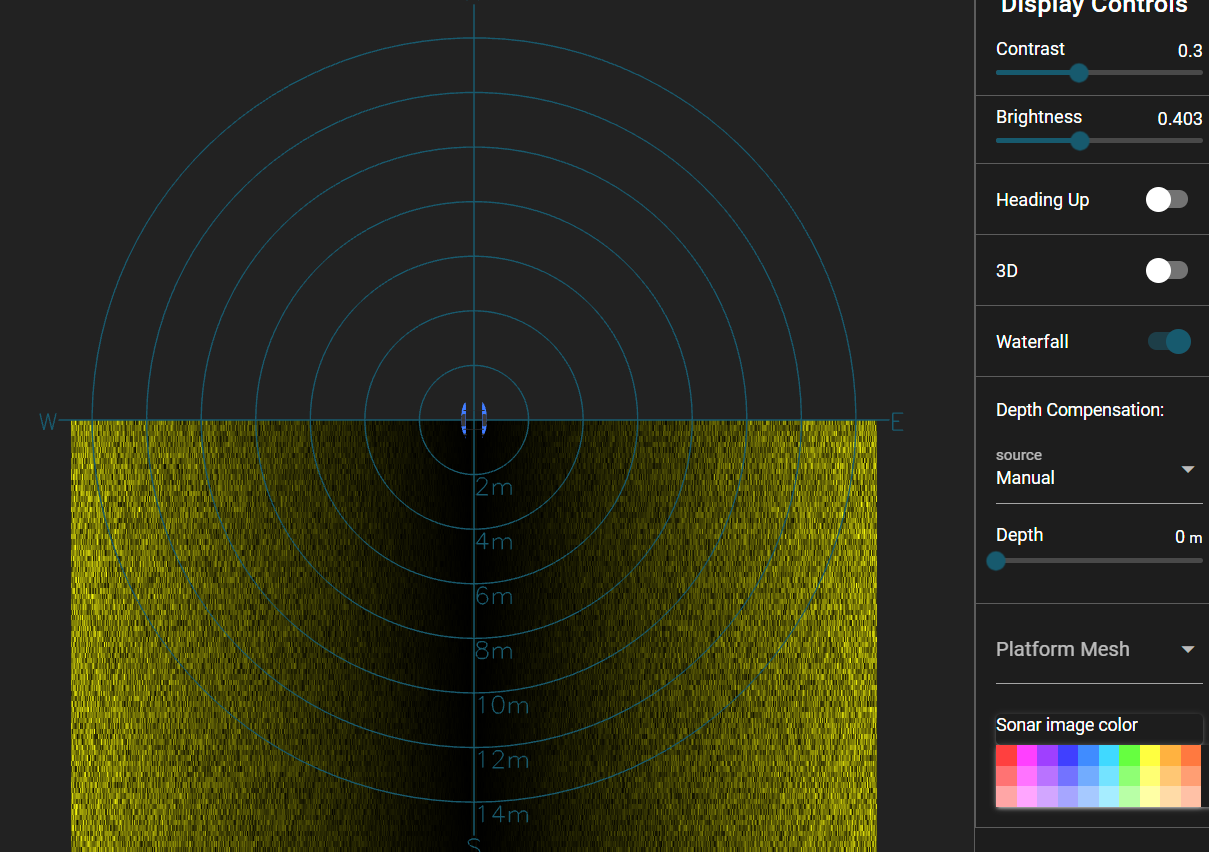
For instance, here is what the images I get from sonarview look like in my testing so far:
The images are always smooth gradients, even when I know that there are discrete objects in the water that should be visible with sonar. There is also no discrete cutoff in the image for the area under the path of the boat that is out of the FOV of the sensors as seen in demos I’ve looked at.
Hi @kingfisher -
Welcome to the forums!
Something does look a bit strange there - you seem to have the depth compensation turned on, and set to 0m - maybe it’s worth turning off?
What water depth have you been testing in? How have the surface water conditions been, calm?
It looks similar with depth compensation turned off. I had to use the web application here since it doesn’t seem like I can turn it off on the desktop application?
Hi @kingfisher -
Wow, that’s quite a shallow body of water! You may want to turn off auto gain, and reduce the gain to a minimum - you may be “overpowering” the environment if it is a small body of water or tank? Make sure you’re using the latest version of the desktop application, they should be identical…
It’s also possible your transducers aren’t connected properly. Make sure you’re fully inserting the wires into the PCB receptacles as the guide details, inside the hull on each lid-tray.
A quick test: out of the water start pinging. If your hearing is as bad as mine you’ll have to put your ear right up to the transducer but you should be able to hear a rapid clicking sound. If not, it’s very likely your transducers are not connected properly.
Well, that image does look like what I would expect if the transducer was not connected, or the vehicle was out of the water. Kinda weird that they both are exhibiting the same symptoms.
To any future readers, the problem was a bug in Omniscan FS/SS Firmware 1.5.8, which was packaged in SonarView 1.13.21-beta. The bug was fixed in Firmware 1.5.9 and SonarView 1.13.22-beta.