# Gripper and Pixhawk strange effect, now dead Gripper and QGC status odd
**URL:** https://discuss.bluerobotics.com/t/gripper-and-pixhawk-strange-effect-now-dead-gripper-and-qgc-status-odd/10965
**Category:** Newton Gripper
**Created:** [November 5, 2021, 3:48pm UTC](https://discuss.bluerobotics.com/t/gripper-and-pixhawk-strange-effect-now-dead-gripper-and-qgc-status-odd/10965 "2021-11-05T15:48:01Z")
**Posts on this page:** 3
**Page:** 1
### Author:  [@Boko](https://discuss.bluerobotics.com/u/Boko)
#### Post date: [November 5, 2021, 3:48pm UTC](https://discuss.bluerobotics.com/t/gripper-and-pixhawk-strange-effect-now-dead-gripper-and-qgc-status-odd/10965/1 "2021-11-05T15:48:01Z")
Hi!
Had a strange effect.
Everthing working normal, did a hard restart of ROV power.
At power on the gripper opened maximum and did not stop for a long time.
When system had booted everything worked, but the gripper was dead.
Did more restarts without effect.
Started to check in QGC/vehicle setup
Here were no longer any frame in summary tab
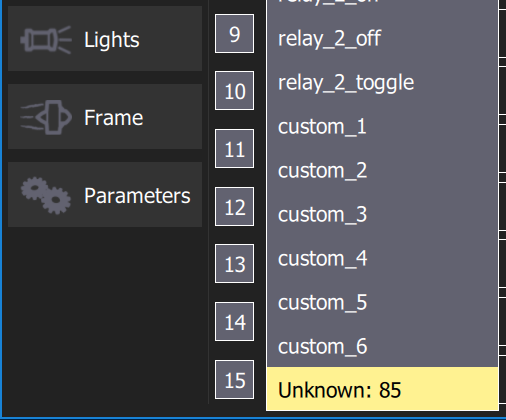
In Joystick tab, button assignment for gripper (servo3) now was “unknown:85”
Also error messages of missing parameters.
After more restarts of QGC suddenly the usual “servo3” is back, (but not at all restarts.)
Now frame can be visible in QGC, but at the same time “unknown:85” instead of “servo3”
It seams that the odd stange restart have burnt the gripper, but also made some software problems.
Opened gripper, have 12V, but the LED marked “green” is not lit.
Need help to find out if the gripper is burned, any way to force movement softwarewise?
And why the software Ardusub/QGC issues is happening.
Ardusub 4.0.3, QGC 4.1.4 and 4,1,2
Bo


---
### Author:  [@Boko](https://discuss.bluerobotics.com/u/Boko)
#### Post date: [November 6, 2021, 12:25pm UTC](https://discuss.bluerobotics.com/t/gripper-and-pixhawk-strange-effect-now-dead-gripper-and-qgc-status-odd/10965/2 "2021-11-06T12:25:00Z")
So, follow up:
Motors coils burned
Control ESC in Gripper burned
QGC can not be started before ROV/Pixhawk, doing that
results in no servo3 availible, and sometimes no Ardusub frame found at all.
Restarting QGC with ROV running fixes the problem.
QGC 4.1.2 and 4.1.4 same thing
So, is the cause for gripper burning this software problem, or is there two issues?
Ie hardware giving up, and software bug at the same time?
Another finding in the gripper is that the planet gear bolts to the motor was lose and no thread glue.
Not lose enough for generating this burning.
Gripper is an R1 version.
Bo
---
### Author:  [@EliotBR](https://discuss.bluerobotics.com/u/EliotBR)
#### Post date: [November 9, 2021, 4:42am UTC](https://discuss.bluerobotics.com/t/gripper-and-pixhawk-strange-effect-now-dead-gripper-and-qgc-status-odd/10965/3 "2021-11-09T04:42:17Z")
Hi @Boko,
I brought this up internally a couple of days ago but haven’t yet had a response.
I’m not sure why this would have happened, but it’s clearly not intended behaviour.
> [@Boko](#):
>
> In Joystick tab, button assignment for gripper (servo3) now was “unknown:85”
In our [BTNn\_FUNCTIONS](https://www.ardusub.com/developers/full-parameter-list.html#btnnfunction-function-for-button), 85 corresponds to `servo_3_max_momentary`, so clearly ArduSub had the correct parameter value stored, but it’s unclear why QGC wasn’t able to read/get the parameter metadata properly.
> [@Boko](#):
>
> Motors coils burned
> Control ESC in Gripper burned
> …
> Another finding in the gripper is that the planet gear bolts to the motor was lose and no thread glue.
> Not lose enough for generating this burning.
> Gripper is an R1 version
Sorry to hear that. I’d recommend you contact [support@bluerobotics.com](mailto:support@bluerobotics.com) to tell them what happened, and link them to this thread. If a replacement/refund is appropriate they’re the people to talk to 🙂
I’m aware that R2 included some hardware and software improvements that increase reliability/robustness (which is mentioned in the [Revision History](https://bluerobotics.com/store/rov/bluerov2-accessories/newton-gripper-asm-r2-rp/#tab-technical-details) on the gripper product page), so regardless of the cause this kind of issue should at least be less likely to occur in future.
> [@Boko](#):
>
> QGC can not be started before ROV/Pixhawk, doing that results in no servo3 availible, and sometimes no Ardusub frame found at all.
> Restarting QGC with ROV running fixes the problem.
> QGC 4.1.2 and 4.1.4 same thing
I was able to replicate this for QGC 4.1.4, but not 4.0.5, so it does seem to be a new 4.1 issue. I’ve filed a bug report here:
>
>
> \## Expected Behaviour
> All parameters properly detected (including metadata) whe…n QGC connects to vehicle
>
> \## Current Behaviour
> Some JS button function values are not detected/recognised if QGC is open before the vehicle is turned on+connected.
>
> \## Steps to Reproduce:
> Please provide an unambiguous set of steps to reproduce the current behavior
> 1. Connect a joystick to computer (I believe this is also fine after step 2 or 3)
> 2. Open QGC
> 3. Power up ArduSub vehicle and connect it to computer running QGC
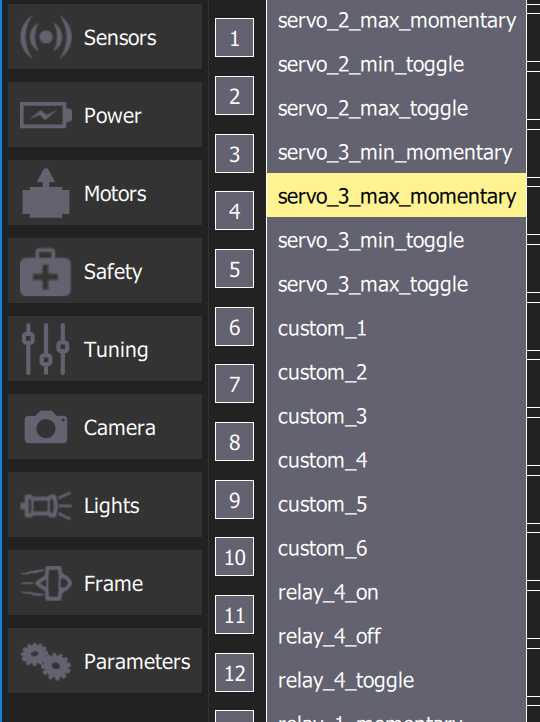
> 4. Go to \`Vehicle Setup/Joystick/Button Assignment\` and check the available button function options (after \`relay\_2\_toggle\` should be \`relay\_3\_on\`, but is actually \`custom\_1\` (which is also valid, just should come later); last value should be \`relay\_4\_momentary\` but is actually \`custom\_6\`)
>
> \## System Information
> When posting bug reports, include the following information
> \- Operating System:
> - Windows 10, via Parallels on MacOS 11.6 and 12.3
> - Windows 10 (normal install)
> - MacOS 12.3
> \- QGC Version:
> - NOT 4.0.5
> - 4.1.7, 4.1.4, and 4.1.2 (suspected \>= 4.1)
> \- QGC build: stable
> \- Flight Controller: Pixhawk I
> \- Autopilot (with version): ArduSub 4.0.3 (stable), 4.1.0 (beta)
>
> \## Detailed Description
> Bug found and discussed a bit in \[this forum thread\](https://discuss.bluerobotics.com/t/gripper-and-pixhawk-strange-effect-now-dead-gripper-and-qgc-status-odd/10965).
>
> Noteworthy points from my testing are:
> \- In particular, a joystick button set to the \`servo\_3\_min\_max\_momentary\` function has its function displayed as \`Unknown: 85\`. More generally, \[\`BTNn\_FUNCTION\`\](https://www.ardusub.com/developers/full-parameter-list.html#btnnfunction-function-for-button)s 57-87 and 101-107 seem to all be missing from the available function names in the dropdown (see screenshots).
> \- restarting QGC while the vehicle is already on and connected resolves the issue
> \- disconnecting the vehicle (physically and then with the "Disconnect" button) then reconnecting it also resolves the issue
> \- issue only seems to appear when the vehicle has been turned off (e.g. disconnecting an on vehicle, and restarting QGC before reconnecting the vehicle doesn't seem to have the same issue) - this point should probably be verified independently, because Mac Parallels might be doing something weird with my connections to QGC on Windows
>
> \## Log Files and Screenshots
> \- QGC Console Log:
> \[button\_functions-invalid-behaviour.txt\](https://github.com/mavlink/qgroundcontrol/files/7501892/button\_functions-invalid-behaviour.txt)
> Log includes initial connection, with missing button functions, then I reconnected the vehicle (described in "Detailed Description") and the button functions were all available (search for \`UDPLink\` to find the two connection points).
> \- Autopilot logs when available (post a link).
> \- Screenshots of QGC to help identify the current issue/bug behavior.
> \
> \Missing joystick button functions - Unknown:85:\
> \ > \
> \
> \Joystick button functions as expected:\
> \
> \
> \
> \Joystick button functions as expected:\
> \ > \
> [@Boko](#):
>
> So, is the cause for gripper burning this software problem, or is there two issues?
> Ie hardware giving up, and software bug at the same time?
It seems like two (seemingly unrelated) issues. While I was able to replicate the weird QGC behaviour (missing the parameter metadata), I didn’t have any unexpected behaviour with the servo\_3 output - when the vehicle turns on the output of AUX 3 is 0, and when/while the assigned button is pressed it goes to 1900, then stays at 1500 when the button is released.
> \
> [@Boko](#):
>
> So, is the cause for gripper burning this software problem, or is there two issues?
> Ie hardware giving up, and software bug at the same time?
It seems like two (seemingly unrelated) issues. While I was able to replicate the weird QGC behaviour (missing the parameter metadata), I didn’t have any unexpected behaviour with the servo\_3 output - when the vehicle turns on the output of AUX 3 is 0, and when/while the assigned button is pressed it goes to 1900, then stays at 1500 when the button is released.